2D points 3D Objects 3D Points Boundary Cursor position Data for selected object Domain Expansion Field Field components Field formula Field tubes Function Generate expansions along 2D boundary Generate expansions for 3D objects Grid formula Grid transformation Info and movie directives Insert Integral Modify 2D expansions MMP Movie Open GL window PET basis PFD (predefined FD) Project Space, plane, arrow, or point Tools and draw Transformation data Window
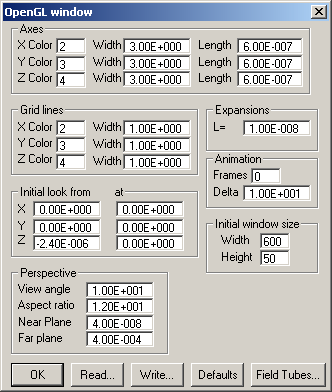
Select Open GL… from the Tools menu to open this dialog. Note that the settings in this dialog become effective when you select reset to initial view from the OpenGL dialog. The OpenGL dialog pops up when you press the right mouse button while the cursor is within the OpenGL window.
In the Axes group you may specify the Color number, Width, and Length of the X, Y, and Z axis of the global coordinate system within the OpenGL window.
In the Grid lines group you may specify the Color number and Width of the X, Y, and Z grid lines within the OpenGL window. Note that grid lines are drawn on the surface of 3D objects. The Z grid line corresponds to the iso-lines.
In the Initial look from at group you may specify the X, Y, and Z coordinates of the point from where you look and of the point at which you look.
In the Perspective group you may specify the (vertical) View angle in degrees, the Aspect ratio, the distance of the eye from the Near plane, and the distance of the eye from the Far plane. Note that only objects between the near plane and the far plane are drawn. The Aspect ratio is defined as (vertical view angle)/(horizontal view angle).
Important note: Depending on the OpenGL driver, the OpenGL hiding procedure may be affected by the location of the Near plane. When you observe improper hiding in the OpenGL window, try to modify the value in the Near plane box. Good hiding performance should be obtained when in the order of 1% of the size of the object drawn in the OpenGL window.
In the Expansions group you may specify the size of the markers of MMP expansions.
In the Animations group you may specify how AVI movies are generated within the OpenGL Graphics window. If the number of Frames is zero, the standard OpenMaXwell movie directives are used for generating the movie. Otherwise, a movie with as many frames as specified in the Frames box will be generated. For each frame the phase angle (in degrees) of time-harmonic field will be increased by the value specified in the Delta box. In this case, the movie directives are ignored.
In the Initial window size group you may specify the initial Height and Width of the OpenGL Graphics window.
Press the Defaults button to let OpenMaXwell compute default values from the view plane defined in the Field dialog and from the data of the current graphic window defined in the Window dialog.
Press the Field Tubes… button to open the corresponding dialog.
Press the Write… button to write OpenGL window data to a file. A file name dialog will allow you to select a file to write to.
Press the Write… button to write OpenGL window data to a file. A file name dialog will allow you to select a file to write to.
Press the OK button to close the dialog.
Responsible for this web page: Ch. Hafner, Computational Optics Group, IEF, ETH, 8092 Zurich, Switzerland
Last update
17.02.2014