2D points 3D Objects 3D Points Boundary Cursor position Data for selected object Domain Expansion Field Field components Field formula Field tubes Function Generate expansions along 2D boundary Generate expansions for 3D objects Grid formula Grid transformation Info and movie directives Insert Integral Modify 2D expansions MMP Movie Open GL window PET basis PFD (predefined FD) Project Space, plane, arrow, or point Tools and draw Transformation data Window
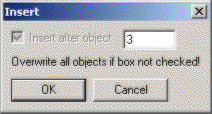
This dialog pops up when you want to insert new objects into a list of objects, for example, when you have selected Expansions from the Modify menu and click with the left mouse button in the Graphic window.
The object can be a boundary or an expansion. The dialog lets you specify the position to insert the object. In the figure above the new object will be inserted after the third object. When the Insert after object box is unchecked, the new objects will overwrite all existing objects.
Press the Cancel button to close the dialog without inserting any objects.
Press the OK button to insert the new objects. Note that the dialog will close.
Responsible for this web page: Ch. Hafner, Computational Optics Group, IEF, ETH, 8092 Zurich, Switzerland
Last update
17.02.2014