2D points 3D Objects 3D Points Boundary Cursor position Data for selected object Domain Expansion Field Field components Field formula Field tubes Function Generate expansions along 2D boundary Generate expansions for 3D objects Grid formula Grid transformation Info and movie directives Insert Integral Modify 2D expansions MMP Movie Open GL window PET basis PFD (predefined FD) Project Space, plane, arrow, or point Tools and draw Transformation data Window
This dialog is permanantly on the screen while OpenMaXwell is running.
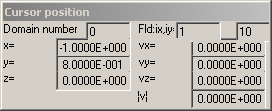
The Cursor position dialog displays the location of the graphic cursor in the different coordinate systems recognized by OpenMaXwell. When the cursor is within a graphic window that displays a field, the components of this field are also displayed in this dialog. Note that the field values are only displayed when Nothing is selected in the Modify menu.
The Domain number of the field point near the current cursor position is displayed in the box to the left of the top line of the Cursor position dialog.
The field grid coordinates ix, iy of the field point near the current cursor position are displayed on the right hand-side of the top line of the Cursor position dialog.
The 3D Cartesian coordinates x, y, z of the field point near the current cursor position are displayed on the left side of the Cursor position dialog.
The Cartesian field components of the derived field, vx, vy, and vz of the field point near the current cursor position are displayed on the right side of the Cursor position dialog as well as the absolute value ŠvŠ of the vector v..
Responsible for this web page: Ch. Hafner, Computational Optics Group, IEF, ETH, 8092 Zurich, Switzerland
Last update
17.02.2014