2D points 3D Objects 3D Points Boundary Cursor position Data for selected object Domain Expansion Field Field components Field formula Field tubes Function Generate expansions along 2D boundary Generate expansions for 3D objects Grid formula Grid transformation Info and movie directives Insert Integral Modify 2D expansions MMP Movie Open GL window PET basis PFD (predefined FD) Project Space, plane, arrow, or point Tools and draw Transformation data Window
This dialog is permanently on the screen while OpenMaXwell is running.
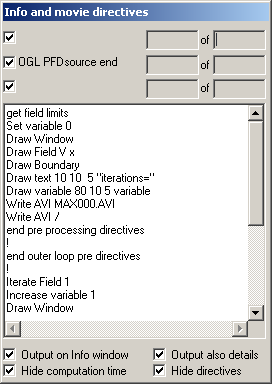
Info and movie directives dialog displays data on the current OpenMaXwell process and results in the first three lines, provided that the corresponding boxes on the left hand side are checked. Note that the top line is most frequently refreshed. Each line has a text part and two numeric output boxes. The latter display the iteration number of the current process in the current loop and the total number of iterations of this loop. The total number of iterations is sometimes not known in advance. In this case, an estimate is displayed. Moreover, there may be exit conditions that are fulfilled before the current iteration number is equal to the number of iterations displayed.
Especially when OpenMaXwell solves small problems, the contents of the first line of the Info and movie directives dialog will many times per second. This prevents you from reading and it also slows down the performance of OpenMaXwell. The output on the first three lines is suppressed when the boxes to the left of each line are not checked. Similarly, the output on the Info window is suppressed when the Output on Info window box is not checked. The additional check boxes Output also details, Hide computation time, and Hide directives help controlling the output amount. Output also details is responsible for additional output including information concerning the computation time and movie directives. Note that even more information on the computation and CPU time may be obtained from the GET CPU directive. Since the computation time information and the movie directive information is not always of interest and because this causes much text output, you may suppress this output by selecting Hide computation time or Hide directives.
The directives box of the
Info and movie
directives dialog is an edit box. It displays
the directives of OpenMaXwell and allows you to modify, add, and delete OpenMaXwell
directives like with a very simple text editor. When you want to check the
syntax or run one of the directives immediately, press the
movie
button  or
select
Movie… from the
Tools
menu.
or
select
Movie… from the
Tools
menu.
Responsible for this web page: Ch. Hafner, Computational Optics Group, IEF, ETH, 8092 Zurich, Switzerland
Last update
28.10.2015